Asynchronous programming is one of the most important concepts in JavaScript, yet it's often where many developers struggle. Whether you're fetching data from an API, reading files, or handling user interactions, understanding how to manage asynchronous operations effectively is crucial for building modern web applications.
In this comprehensive guide, we'll explore JavaScript Promises and the async/await syntax, transforming you from someone who fears asynchronous code into someone who wields it with confidence.
The Problem: Callback Hell
Before Promises, JavaScript developers relied heavily on callbacks to handle asynchronous operations. While callbacks work, they can quickly become unwieldy in complex scenarios, leading to what's commonly known as "callback hell" or the "pyramid of doom."
Callback Hell Example
getData(function(a) {
    getMoreData(a, function(b) {
        getEvenMoreData(b, function(c) {
            getFinalData(c, function(d) {
                // Finally use the data
                console.log(d);
            }, function(error) {
                console.error(error);
            });
        }, function(error) {
            console.error(error);
        });
    }, function(error) {
        console.error(error);
    });
}, function(error) {
    console.error(error);
});
This nested structure is difficult to read, debug, and maintain. Error handling becomes repetitive and cumbersome. Promises provide a much cleaner solution.
Enter Promises: A Better Way
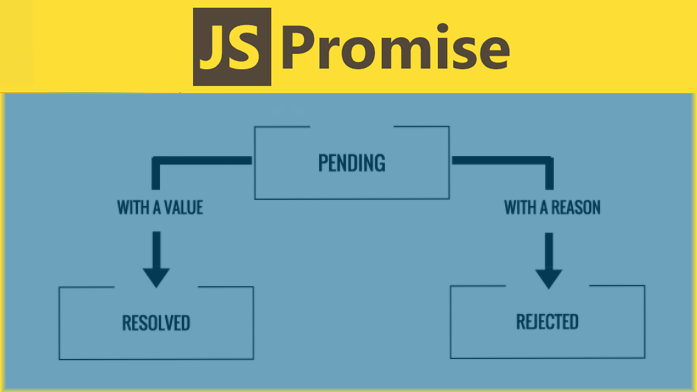
A Promise is an object representing the eventual completion or failure of an asynchronous operation. Think of it as a container for a future value. Promises have three possible states:
Pending
The initial state. The operation is still running and hasn't completed yet.
Fulfilled
The operation completed successfully, and the promise has a value.
Rejected
The operation failed, and the promise has a reason for the failure.
Creating Promises
You can create a Promise using the Promise constructor, which takes a function (called the executor) with two parameters: resolve and reject.
Creating a Basic Promise
const myPromise = new Promise((resolve, reject) => {
    // Simulate an asynchronous operation
    setTimeout(() => {
        const success = Math.random() > 0.5;

        if (success) {
            resolve("Operation completed successfully!");
        } else {
            reject(new Error("Operation failed"));
        }
    }, 2000);
});

// Using the promise
myPromise
    .then(result => {
        console.log(result); // "Operation completed successfully!"
    })
    .catch(error => {
        console.error(error); // Error: Operation failed
    });
Promise Methods: then, catch, and finally
Promises provide several methods to handle their resolution or rejection:
The .then() Method
The then() method is used to handle successful resolution of a promise. It returns a new promise, allowing for chaining.
Promise Chaining with .then()
fetch('/api/user')
    .then(response => response.json())
    .then(user => {
        console.log('User:', user);
        return fetch(`/api/posts/${user.id}`);
    })
    .then(response => response.json())
    .then(posts => {
        console.log('User posts:', posts);
    })
    .catch(error => {
        console.error('Error:', error);
    });
The .catch() Method
The catch() method handles promise rejections. It's equivalent to calling then(null, rejectionHandler).
The .finally() Method
The finally() method executes regardless of whether the promise is fulfilled or rejected. It's perfect for cleanup operations.
Using .finally() for Cleanup
function fetchData() {
    showLoadingSpinner();

    return fetch('/api/data')
        .then(response => response.json())
        .then(data => {
            displayData(data);
        })
        .catch(error => {
            showErrorMessage(error);
        })
        .finally(() => {
            hideLoadingSpinner(); // Always runs
        });
}
Promise Utility Methods
JavaScript provides several utility methods for working with multiple promises:
| Method | Description | Use Case |
|---|---|---|
| Promise.all() | Waits for all promises to resolve | When you need all operations to complete |
| Promise.allSettled() | Waits for all promises to settle | When you want results regardless of success/failure |
| Promise.race() | Resolves with the first settled promise | Implementing timeouts or fastest response |
| Promise.any() | Resolves with the first fulfilled promise | When you need any one success |
Promise.all() Example
const promises = [
    fetch('/api/users'),
    fetch('/api/posts'),
    fetch('/api/comments')
];

Promise.all(promises)
    .then(responses => {
        // All requests completed successfully
        return Promise.all(responses.map(response => response.json()));
    })
    .then(data => {
        const [users, posts, comments] = data;
        console.log('All data loaded:', { users, posts, comments });
    })
    .catch(error => {
        console.error('One or more requests failed:', error);
    });
Async/Await: Syntactic Sugar for Promises
While Promises solve the callback hell problem, the async/await syntax makes asynchronous code even more readable by allowing you to write it in a synchronous style.
Converting Promises to Async/Await
// Using Promises
function fetchUserData() {
    return fetch('/api/user')
        .then(response => response.json())
        .then(user => {
            return fetch(`/api/posts/${user.id}`);
        })
        .then(response => response.json())
        .catch(error => {
            console.error('Error:', error);
            throw error;
        });
}

// Using Async/Await
async function fetchUserData() {
    try {
        const userResponse = await fetch('/api/user');
        const user = await userResponse.json();

        const postsResponse = await fetch(`/api/posts/${user.id}`);
        const posts = await postsResponse.json();

        return posts;
    } catch (error) {
        console.error('Error:', error);
        throw error;
    }
}
Understanding Async Functions
An async function always returns a Promise. If the function returns a value, the Promise resolves with that value. If the function throws an error, the Promise rejects with that error.
Important Note
The await keyword can only be used inside async functions. Attempting to use await at the top level (outside of an async function) will result in a syntax error in most environments, though some modern environments support top-level await.
Error Handling with Async/Await
Error handling with async/await uses traditional try/catch blocks, making it more familiar to developers coming from synchronous programming languages.
Comprehensive Error Handling
async function robustApiCall() {
    try {
        const response = await fetch('/api/data');

        if (!response.ok) {
            throw new Error(`HTTP error! status: ${response.status}`);
        }

        const data = await response.json();
        return data;

    } catch (error) {
        if (error instanceof TypeError) {
            console.error('Network error:', error.message);
        } else if (error instanceof SyntaxError) {
            console.error('JSON parsing error:', error.message);
        } else {
            console.error('Unknown error:', error.message);
        }

        // Re-throw the error if you want calling code to handle it
        throw error;
    }
}
Common Async/Await Patterns
Sequential vs Parallel Execution
Understanding when operations should run sequentially versus in parallel is crucial for performance.
Sequential Execution
// Sequential - each operation waits for the previous one
async function sequentialOperations() {
    const result1 = await operation1();  // Wait for this
    const result2 = await operation2();  // Then this
    const result3 = await operation3();  // Then this

    return [result1, result2, result3];
}
Parallel Execution
// Parallel - all operations start simultaneously
async function parallelOperations() {
    const [result1, result2, result3] = await Promise.all([
        operation1(),  // All start at the same time
        operation2(),
        operation3()
    ]);

    return [result1, result2, result3];
}
Real-World Examples
Example 1: Fetching and Processing Data
Data Fetching Pattern
async function loadUserDashboard(userId) {
    try {
        // Show loading state
        showLoadingSpinner();

        // Fetch multiple data sources in parallel
        const [user, posts, notifications] = await Promise.all([
            fetchUser(userId),
            fetchUserPosts(userId),
            fetchUserNotifications(userId)
        ]);

        // Process the data
        const processedData = {
            user: processUserData(user),
            posts: processPosts(posts),
            notifications: processNotifications(notifications)
        };

        // Update the UI
        updateDashboard(processedData);

    } catch (error) {
        showErrorMessage('Failed to load dashboard');
        console.error('Dashboard error:', error);
    } finally {
        hideLoadingSpinner();
    }
}
Example 2: Form Submission with Validation
Form Handling Pattern
async function handleFormSubmission(formData) {
    try {
        // Validate form data
        const validationErrors = await validateFormData(formData);
        if (validationErrors.length > 0) {
            displayValidationErrors(validationErrors);
            return;
        }

        // Disable form and show loading
        disableForm();
        showSubmissionLoader();

        // Submit data
        const response = await fetch('/api/submit', {
            method: 'POST',
            headers: {
                'Content-Type': 'application/json',
            },
            body: JSON.stringify(formData)
        });

        if (!response.ok) {
            throw new Error(`Submission failed: ${response.statusText}`);
        }

        const result = await response.json();
        showSuccessMessage('Form submitted successfully!');
        redirectToSuccessPage(result.id);

    } catch (error) {
        showErrorMessage('Submission failed. Please try again.');
        console.error('Form submission error:', error);
    } finally {
        enableForm();
        hideSubmissionLoader();
    }
}
Common Pitfalls and How to Avoid Them
1. Forgetting to Use Await
One of the most common mistakes is forgetting the await keyword, which can lead to unexpected behavior.
Incorrect - Missing Await
async function incorrectExample() {
    const data = fetch('/api/data'); // Missing await!
    console.log(data); // Logs a Promise, not the data
}
2. Using Async/Await in Loops Incorrectly
Be careful when using async/await in loops, as it can lead to sequential execution when parallel might be better.
Correct Loop Patterns
// For sequential processing
async function processItemsSequentially(items) {
    const results = [];
    for (const item of items) {
        const result = await processItem(item);
        results.push(result);
    }
    return results;
}

// For parallel processing
async function processItemsInParallel(items) {
    const promises = items.map(item => processItem(item));
    return await Promise.all(promises);
}
Performance Considerations
While async/await makes code more readable, it's important to understand the performance implications of your choices:
- Use parallel execution when operations are independent
- Consider using Promise.allSettled() when you want all operations to complete regardless of individual failures
- Implement proper timeout mechanisms for long-running operations
- Cache frequently requested data to reduce redundant network calls
Testing Asynchronous Code
Testing async code requires special consideration. Most testing frameworks support async tests:
Testing Async Functions
// Jest example
describe('User API', () => {
    test('should fetch user data', async () => {
        const userData = await fetchUser('123');

        expect(userData).toBeDefined();
        expect(userData.id).toBe('123');
    });

    test('should handle fetch errors', async () => {
        await expect(fetchUser('invalid')).rejects.toThrow('User not found');
    });
});
Conclusion
Mastering Promises and async/await is essential for modern JavaScript development. These tools transform complex asynchronous operations into readable, maintainable code. Remember these key takeaways:
- Promises provide a cleaner alternative to callback-based code
- Async/await makes asynchronous code look and feel synchronous
- Always handle errors appropriately with try/catch blocks
- Consider whether operations should run sequentially or in parallel
- Use Promise utility methods like Promise.all() for multiple operations
- Test your asynchronous code thoroughly
As you continue your JavaScript journey, practice with these concepts by building real applications. Start with simple API calls and gradually work your way up to complex data flows. The more you work with Promises and async/await, the more natural they'll become, and soon you'll wonder how you ever lived without them.